


Argo File Cleanup
3.819.00 Reviews
App Specs
- Version
- 3.0
- Updated On
- License
- Free
- Downloads
- 10,000+
- Developer
- ZXISY CO., LIMITED
- Categories
- Tools
- Platform
- Android
Screenshots
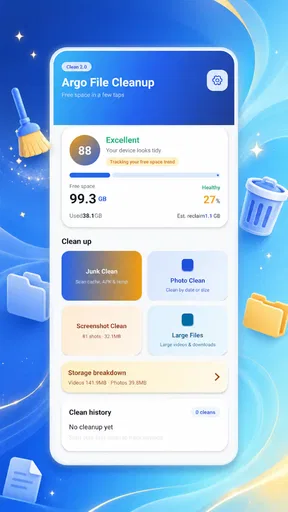
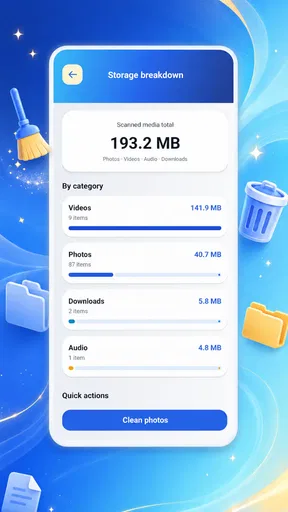
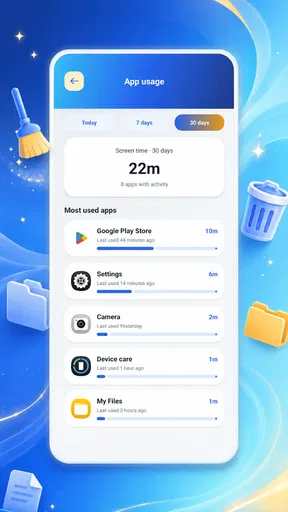
 Analysis by AppCompare
I judge a file-cleanup tool less by how much it promises to remove and more by whether I can understand what it is doing before I let it touch my files. Argo File Cleanup is a free utility from ZXISY CO., LIMITED, aimed at people who want a straightforward way to tidy a phone without wading through a complicated interface. Its appeal is clear from the outset: this is meant to be a practical, approachable tool, not a control panel for managing every detail of a device.
That simplicity matters for accessibility, but it also creates a trade-off. A clear screen can make routine tasks easier to approach, while limited explanation or control can leave some users unsure about what a cleanup action will affect. I would consider it for occasional housekeeping, especially if a busy storage screen feels intimidating. I would not treat any cleanup app as a substitute for reviewing important files yourself.
How the interface supports everyday use
I find the most useful way to judge a cleanup interface is to ask whether it helps me make one clear decision at a time, rather than urging me to clear space quickly. That matters especially when I am tired, sharing a phone, or helping someone else manage their files. I’d use this section to consider how a focused layout can ease everyday navigation while still leaving room to pause and verify before acting.
Readability and navigation
The app is positioned around a simple interface and easy-to-use tools, and that is the right direction for a utility people may open only when storage becomes a problem. A focused cleanup experience can be less tiring than digging through several system menus or a file manager with many unrelated options. For someone who is not comfortable with device settings, fewer decisions can make the first step feel manageable.
Still, “simple” is not automatically the same as “clear for everyone.” With cleanup tools, the important question is whether each screen makes the difference between reviewing files and removing them obvious. I recommend pausing at any confirmation step and reading the action before continuing. If you are unsure what a button will do, backing out is better than tapping quickly just to get through the process.
One useful habit is to open a cleanup app when you have time to inspect the results rather than when you are rushing to record a video or download something. That small change makes the experience more forgiving: you can compare what the tool flags with files you recognize, instead of treating its suggestion as an instruction. It is a practical safeguard for anyone who finds dense screens or unfamiliar labels difficult to process.
Argo’s current version is 3.0, and it is intended for devices running Android 8.0 or later. The app has an Everyone content rating, which is useful context for households sharing a device, though it does not tell you whether its interface suits a particular person’s eyesight, reading ability, or comfort with file management. I would make that judgment by trying the screens at a relaxed pace, not by assuming an age label guarantees accessibility.
Worth Reading Before You Choose

EA SPORTS FC Mobile 26 Is a Bigger Football Game, but It Takes Time

Flipboard Shows What News Apps Must Do Beyond the Feed

Switching to Android Auto Means Rethinking Your Driving Routine

Google Calendar Makes a Crowded Week Easier to Manage

Ludo King Makes the Most of the Minutes Between Plans

Baby Panda World Brings Quick Play to Modern Phones, but Its Game Library Feels Busy
Motor and sensory considerations
For users who have limited dexterity, a cleanup workflow is easiest when it avoids rushed taps and makes potentially destructive choices distinguishable from harmless navigation. I cannot assume that every control is large, spaced out, or compatible with a particular assistive setup, so I would test the basic route cautiously before relying on it. If reaching a small control or correcting a mistaken tap is difficult, keep the first session to a low-stakes review rather than a full cleanup.
Sensory needs deserve the same practical approach. A utility that stays focused on file housekeeping may be less distracting than a general-purpose device manager packed with unrelated panels. On the other hand, anyone who depends on strong visual contrast, enlarged text, screen reading, or reduced motion should check how the app behaves with their existing phone settings before using it for anything consequential. The experience can vary with device configuration, and a clean-looking interface alone does not establish that every accessibility need is covered.
A concrete tip: make a small test run with files you already know are expendable, then stop and check the result in the phone’s own file browser. This gives you a chance to learn the app’s language and interaction pattern without making an important document, photo, or download part of the experiment. It is especially useful if you use a screen reader or need extra time to interpret each choice.
There is also a trade-off between fewer controls and confidence. People who prefer a guided, low-effort task may welcome a streamlined tool. People who want to inspect file paths, sort by several properties, or handle each item individually may feel better using a full file manager. Neither preference is a weakness; it is a question of whether the interface matches the way you make decisions.
Using it when circumstances are less than ideal
Cleanup often happens in inconvenient moments: a phone warns that space is running low before a trip, a large download will not fit, or a family member asks for help freeing room. In those situations, a tool with a simple purpose can be less daunting than manually searching through every folder. I would use Argo as a starting point for a deliberate check, not as a one-tap answer to an urgent warning.
For example, before leaving home, you might notice that a planned offline download cannot complete. Rather than clearing files while distracted in a station or car park, open the app somewhere you can stop and review what it identifies. Then check anything you care about in the device’s regular file browser before deciding what can go. That workflow reduces the chance of confusing “unneeded” with “unfamiliar,” which is a real risk when a device contains work attachments, shared photos, or files saved by other apps.
Argo may also be more approachable for a relative who rarely manages storage, provided you sit with them for the first session and explain that suggestions deserve a second look. The app is free, so trying it does not require a purchase decision; the more important cost is attention. If someone is easily overwhelmed by uncertain choices, doing the review together is kinder and safer than handing over a cleanup screen and expecting them to guess.
Its public reception is modest but established: it has a 3.8 average from around 125 ratings, with 10K+ installs. I treat those figures as context rather than proof that it will work well for a particular device or accessibility setup. A rating can signal that people have tried it, but your own first, cautious session is a better test of whether its layout and wording make sense to you.
Where it may still create barriers
The central limitation of a simplified cleanup tool is that a short route can conceal complexity. Files that look disposable may be important later, and people who do not recognize where a file came from can be at a disadvantage. I would not approve removals simply because an app surfaces them. Review names and locations where possible, and keep anything uncertain until you can identify it through the app that created it or your normal file browser.
This is also not the right choice for someone seeking detailed storage analysis or highly controlled file organization. A dedicated file manager is usually a better fit when you need to browse folders, rename items, move them between locations, or make careful selections one by one. A phone’s built-in storage controls may be preferable when you want to stay close to familiar system settings. Argo’s value is in offering a focused cleanup route, not in replacing every tool for managing files.
Another possible barrier is relying on an interface that has not yet been tested with your preferred accessibility settings. If text is hard to read, controls are difficult to target, or screen-reading output is confusing on your device, do not push through a consequential cleanup just because the app is designed to be easy to use. Switch to a tool you can operate confidently, or ask someone you trust to help you review the choices.
For anyone managing a shared phone, I would be especially careful about ownership. A download may belong to another family member, and a file that looks old may still be needed for school, work, or travel. A good routine is to ask before removing anything from shared storage and to avoid cleaning the device while another person is relying on it. This is not a special app feature; it is a sensible way to prevent a simple maintenance task from becoming a frustrating loss.
Who is likely to find it useful?
I can see Argo suiting people who want a dedicated, uncomplicated cleanup utility and are comfortable checking suggested files before acting. It is a reasonable candidate for someone who finds broad system settings confusing, or who wants a focused place to begin when the phone feels cluttered. Its Everyone rating and free availability lower the friction of trying it, while its Android 8.0 minimum makes the supported starting point clear.
I would steer away from it if you need advanced sorting, precise folder-by-folder control, or an interface already known to work with a specific assistive technology. I would also skip any automatic or rapid cleanup approach if you are unsure what is safe to remove. In those cases, the phone’s built-in storage screen, a familiar file manager, or help from a trusted person may offer better visibility and control.
My strongest practical advice is to treat the first use as an orientation session. Look through the app without rushing, learn how it describes cleanup choices, and verify any result that matters. After that, you will know whether its simpler approach is genuinely easier for you or whether you need a more detailed alternative. That is a more useful test than assuming a clean design works equally well for every ability and situation.
Choosing a cleanup routine that fits
There is a useful distinction between a cleanup app and a storage-management routine. The app can provide a focused place to begin, but it cannot decide which old download you may need next month or whether a duplicate-looking picture is the copy you meant to keep. I would use it as one checkpoint in a routine: review possible clutter, verify anything unfamiliar elsewhere, and then revisit what remains if the phone still feels full.
That approach is also more forgiving for people who process information slowly or need help from another person. Rather than trying to interpret a long session all at once, divide the task into short decisions. If you are assisting a relative, let them make the final choice about personal photos and documents; you can help identify where a file came from without taking over the decision. It turns a potentially stressful cleanup into a shared, understandable task.
For a crowded family phone, I would avoid using a brief free moment to clear everything that looks old. First identify whether the problem is a temporary download, a collection of personal media, or something that belongs to another person. That simple pause can determine whether a focused cleanup tool is enough or whether the built-in storage view or a file manager would give the needed context. The right tool depends on the decision, not just the amount of clutter.
An inclusive verdict on Argo File Cleanup
Argo File Cleanup makes sense as a low-friction place to start with phone housekeeping, particularly for people who prefer a focused utility over a sprawling file-management interface. I like the practical aim of reducing the effort involved in getting oriented, and the free Tools app from ZXISY CO., LIMITED is easy to consider for occasional use. Its 3.8 average and modest install base offer some background, but they do not replace checking its controls on your own device.
My recommendation is conditional: try it slowly, keep important files out of any rushed cleanup, and judge the interface against your own visual, motor, and sensory needs. If the screens help you understand what is being considered, it can be a useful starting point. If they leave you guessing, choose a more transparent file manager or familiar system tool instead. A cleanup app should make phone maintenance less stressful; it should never require you to trade confidence for convenience.
Pros
- Simple interface makes it easy to find cleanup tools.
- Can help identify files that may be taking up storage space.
- Useful for routine storage checks on a phone.
- Cleanup options let users choose what to remove.
- A dedicated file-cleanup app keeps storage tools in one place.
Cons
- Review files carefully before deleting to avoid losing needed data.
- Cleanup results may depend on the files and access permissions granted.
- Some files may be difficult to recognize from their names or locations.
- The app may request broad access to files on your device.
- Available features and performance can vary by Android version.
FAQs for Argo File Cleanup
What is Argo File Cleanup, and what does it do?
Argo File Cleanup is a utility app intended to help you find and remove files that may be taking up unnecessary space on your device. Depending on the version and platform, its tools may include scanning for temporary files, large items, or duplicate content. Review the scan results before deleting anything: cleanup apps cannot always determine whether a file is safe to remove, and features may differ between Android and iOS.
Is Argo File Cleanup safe to use, and can it delete important files?
The app can help identify files for cleanup, but no automated scan is a guarantee that every suggested item is disposable. Check the file names, locations, and categories shown before confirming removal, and avoid deleting documents, photos, downloads, or app data you still need. Keep a separate backup of important files. Also review the app’s permissions and privacy information in the official store listing before granting access.
Does Argo File Cleanup work on both Android and iPhone?
Availability and functionality can vary by operating system, device, and app version. Android may permit broader access to storage-management features, while iOS generally restricts apps from scanning or cleaning other apps’ private data. Before downloading, confirm that Argo File Cleanup is listed for your device in the official Google Play Store or Apple App Store, and check the supported OS versions and feature descriptions.
Is Argo File Cleanup free, and are there subscriptions or in-app purchases?
The price and payment model can change over time or differ by platform. Check the app’s official store listing for its current price, in-app purchases, subscription options, trial terms, and any limits on free features before installing. If you start a trial or subscription, note its renewal date and cancellation instructions; deleting the app alone usually does not cancel a subscription managed through the app store.
What should I check before downloading Argo File Cleanup?
Use the official app-store listing and verify the developer name, recent update date, user reviews, requested permissions, and privacy details. Make sure your device meets the stated system requirements and has enough free space for installation. After installing, start with a scan and inspect its recommendations rather than approving every deletion at once. Backing up valuable files first is a sensible precaution, especially before removing duplicates or large files.


